
Article summary
- Most websites stop too early: they explain the business, show a contact form, and leave the rest of the customer journey to manual follow-up.
- A modern website can connect lead capture, CRM, AI qualification, automated email, booking, invoices, follow-up, and analytics.
- Automation works best when it removes repetitive admin while keeping people in control of decisions and relationships.
- Small businesses can start with simple workflows: form routing, reminders, booking confirmations, review requests, CRM updates, and follow-up emails.
- The goal is not to make the business impersonal. The goal is to respond faster, miss fewer enquiries, and give customers a smoother experience.
Key takeaways
- Treat the website as the start of the customer journey, not the final destination.
- Connect forms and booking paths to a CRM or structured lead list so enquiries are not lost in inboxes.
- Use AI for practical support such as summarising enquiries, answering FAQs, searching documents, and drafting replies.
- Automate repeated steps before automating complex decisions.
- Measure important actions with analytics events so the business can improve the workflow over time.
The short answer
Most businesses think the website is the final destination. A visitor lands on the homepage, reads a service page, clicks "Contact Us", and the website has done its job.
That view is understandable, but it is incomplete. In a modern business, the website should be the beginning of the customer journey. It should help a visitor understand the offer, take the next step, and move into a clear workflow that the business can actually manage.
That workflow might include a contact form, a booking calendar, a CRM, an AI assistant, an automatic email, a reminder, an invoice, a follow-up message, and analytics. None of this needs to feel complicated. The point is simple: fewer missed enquiries, faster responses, better customer experience, and less manual work for the team.
If you are planning a new business website or reviewing an existing one, the question is no longer only "Does the site look professional?" A better question is: "What happens after someone shows interest?"
The traditional customer journey
Many small business websites still work like this:
Visitor
-> Contact form
-> Someone manually checks email
-> Someone manually replies
-> Lead forgotten
-> Lost opportunity
This journey looks harmless because every step feels normal. A form goes to an inbox. Someone replies when they have time. If the customer is serious, they will wait.
But customers often do not wait. They are comparing options, searching on mobile, asking questions after business hours, and contacting more than one provider. If your reply takes too long, or if the message lands in the wrong inbox, the opportunity can disappear before anyone notices.
The traditional journey also creates hidden admin work. A team member copies the enquiry into a spreadsheet. Another person sends a calendar link. Someone else forgets to follow up. The same questions are answered again and again. A quote is prepared manually. Later, an invoice is created from scratch.
Nothing looks broken from the outside. Inside the business, time leaks through tiny repeated tasks.
The modern customer journey
A modern customer journey does not replace people. It supports them.
Visitor
-> Website
-> Lead Capture
-> CRM
-> AI Qualification
-> Automatic Email
-> Meeting Booking
-> Invoice
-> Customer
-> Follow-up
-> Repeat Business
Here is what that means in plain English.
The website explains the business clearly and gives the visitor a relevant next step. Lead capture records the enquiry with useful context, not just a name and email address. A CRM stores the lead so it does not disappear in an inbox. AI qualification can summarise the enquiry, detect the service type, or suggest useful follow-up questions. An automatic email confirms that the enquiry was received and explains what happens next.
Booking automation lets the customer choose a time without five emails back and forth. Invoice automation can prepare routine payment documents. Follow-up automation can remind the team to check in, ask for a review, or send useful information after the service is complete. Analytics can show which pages and actions are creating real business value; Google Analytics events are designed for measuring meaningful user interactions such as form submissions and clicks.
This is website automation in the practical sense. It is not about building a huge system on day one. It is about connecting the obvious steps so the business can respond faster and stay organised.
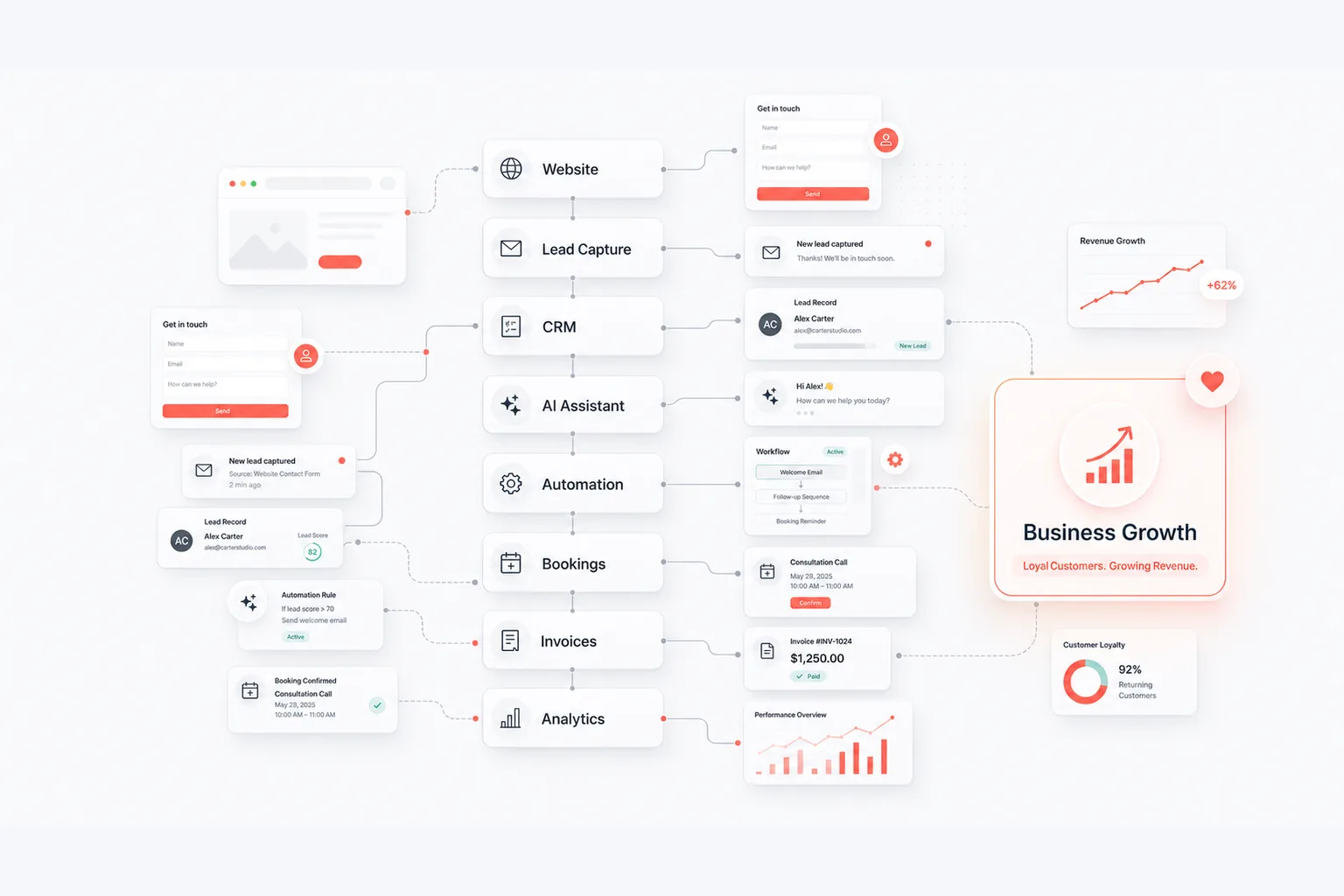
A simple workflow diagram
If you picture the website as part of a wider business system, the flow becomes easier to understand:
Website
-> Lead
-> CRM
-> Automation
-> Bookings
-> Invoices
-> Analytics
-> Business Growth
This is a useful illustration for planning because it shows where the website stops and the business process begins. The best results usually come from improving the connection between these steps.
For example, a beautiful contact page is helpful. A contact page that sends the enquiry to the right person, records the service type, creates a CRM entry, sends a confirmation, and triggers a follow-up task is much more useful.
Real examples
Physiotherapy clinic
A physiotherapy clinic may already have a website with services, prices, team information and a contact form. The next step is to reduce the admin around appointments.
A stronger workflow might include online appointment booking, automatic reminders, digital intake forms, follow-up emails after the appointment, and a review request after a successful treatment plan.
The business outcome is not "more technology." The outcome is fewer missed calls, fewer no-shows, cleaner intake information, and a more professional patient experience.
Restaurant
A restaurant website should not only show the menu and opening hours. It can support reservations, confirmations, reminders, dietary notes, private event enquiries, feedback requests, and repeat visits.
A simple restaurant workflow could accept a reservation, send a confirmation, remind the guest on the day, ask for feedback afterward, and invite happy customers to book again for a seasonal menu or event.
The outcome is smoother front-of-house communication and less manual checking. Customers feel informed, and staff spend less time answering the same operational questions.
Consultant
A consultant often receives vague enquiries: "Can you help with our project?" A modern workflow can make that first conversation much better.
The contact form can ask a few useful questions. AI can summarise the enquiry and classify the project type. The lead can be added to a CRM. The prospect can receive a polite confirmation and a booking link. After the call, the consultant can prepare a proposal using structured notes instead of starting from a blank page.
The outcome is better qualified leads, clearer calls, faster proposals, and less time spent chasing incomplete information.
Electrician
An electrician may receive quote requests through calls, WhatsApp, forms and email. Without structure, details get lost: address, urgency, photos, preferred times, and invoice information.
A practical workflow could collect quote details through the website, route urgent jobs differently, add the customer to a CRM, create a scheduling task, prepare an invoice, and send a follow-up message after the work is complete.
The outcome is better scheduling, cleaner paperwork, and fewer forgotten follow-ups.
Benefits of website automation
The benefits are not abstract. They show up in everyday business operations.
- Faster responses: Customers get confirmation immediately, even when the team is busy.
- Less manual work: Repeated copying, sorting, reminding and sending can be reduced.
- Fewer missed enquiries: Leads are stored in a CRM or structured list instead of disappearing in an inbox.
- More qualified leads: Forms and AI summaries can collect better context before a human replies.
- Better customer experience: People know what happens next and do not need to chase basic information.
- Higher conversion rates: A smoother next step reduces hesitation between interest and action.
- More repeat customers: Follow-up messages, reminders and review requests help the relationship continue.
- Hours saved every week: Small tasks add up, especially when the same workflow happens every day.
The reason automation works is simple: business owners are usually not short of effort. They are short of reliable systems. A system remembers the next step even when the team is busy.
Common misconceptions
"My business is too small."
Small businesses often benefit the most because they have fewer people to catch mistakes manually. A solo consultant, clinic, restaurant or trade business does not need a complex platform. It may only need a better contact form, booking flow, CRM update and follow-up reminder.
"Automation is expensive."
It can be expensive if the scope is unclear. It does not have to be. The safest starting point is one repeated workflow that already costs time: enquiry handling, appointment reminders, invoice preparation, review requests, or customer onboarding.
"I don't need AI."
Maybe you do not need AI yet. That is fine. Automation can work without AI. But AI can help when the task involves language: summarising messages, answering FAQs, searching documents, classifying enquiries, or drafting replies for review.
"It sounds complicated."
The language can sound complicated. The work does not need to be. Good automation starts by writing down what already happens, then connecting the steps that are repeated and predictable.
Where AI actually helps
AI is useful when it supports real work. It should not replace people who need to make decisions, build trust or handle sensitive situations.
For small businesses, practical AI support can include:
- answering common website questions;
- summarising long enquiries;
- searching company documents;
- qualifying leads based on service type or urgency;
- drafting email replies for human review;
- preparing notes before a sales call;
- helping staff find internal information faster.
This is where AI automation can be valuable. It reduces repetitive language work while keeping the human relationship intact. The NIST AI Risk Management Framework is a useful reminder that AI systems should be managed with attention to reliability, transparency and human context.
When should a business automate?
You do not need to automate everything. In fact, you should not.
Start looking for automation opportunities when:
- you answer the same emails every day;
- you manually copy customer information between tools;
- you forget to follow up;
- appointments are managed manually;
- invoices are repetitive;
- customer requests arrive in too many places;
- your team spends too much time on administration;
- customers often ask what happens next;
- leads are hard to track after the first contact.
These are signs of a workflow problem. A better website alone may help, but the bigger improvement often comes from connecting the website to CRM automation, email, booking and analytics.
What to automate first
The best first automation is usually not the fanciest one. It is the one that removes the most obvious delay.
For many businesses, that means:
- send every website enquiry to one structured place;
- label the enquiry by service type;
- send an immediate confirmation email;
- create a follow-up task;
- offer a booking link where appropriate;
- track form submissions and important button clicks;
- review the workflow monthly.
This is enough to change the feel of the business. Customers get faster responses. The team sees what is open. Owners can understand where enquiries come from. Over time, analytics and Search Console can help show which pages are bringing useful attention from search.
If the website foundation itself is weak, start there. The Services and Pricing page explains the difference between a website foundation, growth setup, AI and data upgrade, and maintenance. The live examples show how a website can become more than a static brochure.
How Websiteli approaches this
Websiteli builds websites as part of a wider business system. That includes website structure, SEO foundations, forms, CRM thinking, AI assistants, automation, analytics and long-term support.
The goal is not to force every business into the same technology stack. A restaurant, clinic, consultant and electrician need different workflows. The shared principle is that the website should not leave the owner with more manual work than necessary.
Good automation is calm. It is visible enough to be trusted, simple enough to maintain, and useful enough that the business feels the difference.
Common questions about website automation
What is business automation?
Business automation means using software to handle repeated steps in a process. That might include sending confirmations, updating a CRM, routing enquiries, creating reminders, generating documents or preparing follow-up tasks.
Do small businesses need automation?
Small businesses do not need large, complex systems. They often need a few simple workflows that stop leads from being missed and reduce repeated admin.
Can AI help without replacing employees?
Yes. AI is best used as support: answering FAQs, summarising enquiries, searching documents, qualifying leads or drafting messages for review. It should help people spend more time on the work that needs judgment.
How much automation is enough?
Enough automation removes repeated friction without making the customer experience feel cold. Start with one workflow, measure whether it helps, then improve gradually.
When should I automate my website?
Automate when the same step keeps causing delay, missed enquiries or repeated admin. Common starting points are forms, CRM updates, appointment reminders, booking links, invoice workflows and follow-up emails.
Conclusion
The best websites are no longer digital brochures. They are part of the business.
A useful website explains the offer, builds trust and creates a clear next step. A stronger website connects that next step to CRM, AI, automation, booking, invoicing, follow-up and analytics. That is how a visitor becomes a lead, a lead becomes a customer, and a customer can become repeat business.
This does not require a huge transformation. It starts with one practical question: what should happen after someone clicks "Contact Us"?
If you are planning a new website or wondering which parts of your business could be automated, Websiteli can help you identify the highest-value opportunities and turn them into a clear, manageable workflow. You can start with the contact page when you are ready to explore the next step.